What's New in Automation Studio™ P10.0
Once more, Automation Studio™ P10.0 - Professional Edition pushes the ‘Trade-Oriented’ concept implemented in the software a step further, always with the same objective: achieve higher productivity with less effort. Designers, test and reliability specialists, trainers and maintenance technicians and engineers will all appreciate the new features and functions and add them to their box of essential tools.
Contact us for a Live Online Demonstration of the new features.

Request a Demo
*The availability of some of the new features is subject to the configuration of the purchased license.
Multibody System Dynamics
The Multibody System Dynamics workshop allows the creation of spatial mechanisms through an intuitive and user-friendly interface.
New types of joints have been added, such as helical joints. Transmission creation is now supported, including gears, racks and pinions, and prismatic links.
Furthermore, a generic transmission enables the creation of customized transmissions.
Dynamic simulation of spatial mechanisms expands the range of possible analyses for design or training purposes.
Mechanisms can be run independently or co-simulated with other power workshops, such as hydraulics, pneumatics, or electrical engineering.
Streamline your design with our all-in-one electrical harness solution. Easily create electrical circuits, design 3D network topologies by using parts from manufacturers' catalogues, and generate wiring harnesses.
Benefit from automated wire and cable length calculations, real-time data synchronization, comprehensive reporting, and a seamless workflow for precise and efficient design and production.
The 3D network can be drawn flat, on a structure, or on an imported mechanical part (such as a moving machine). Supports, fasteners, and sheathes are available in both the generic library and manufacturers' catalogues.
The full-scale formboard is automatically generated from the 3D harness. Users can easily adjust the position of branches, connectors, and other components. They can also add the required length and diameter measurements, which are automatically calculated, along with other relevant information.
The connection diagram is a technical document that provides detailed and visual information on how to connect the various components of a system.
Unlike the design diagram, the connection diagram includes all connection elements and their technical characteristics, ensuring high-quality system assembly.
The Fluid Connection Diagram can be generated automatically based on the fluid design circuit.
The fitting, conduit, assembled conduit, and component port configurators allow precise definition of connections between all circuit elements.
The reports document all fittings and pipes, along with their attributes, essential for quality assembly and maintenance.
The piping and instrumentation diagram has been updated with exclusive features dedicated to drafting, documentation and simulation of piping and instrumentation diagrams.
Piping, components, and instrumentation each follow independent standards that control attributes ranging from visual appearance of components to documentation of properties.
A new architecture for Uni/Area – Circuits allows users to define specific circuits and installations for piping, equipment, and communication signals, enhancing documentation, edition, and simulation capabilities.
The R-134a refrigerant is now available in both the liquid and gas lists. Combined with custom components, this enables the modelling of refrigeration circuits for HVAC systems.
New Component Builders
Four new builders have been added to the Instrumentation and Process Control library, allowing users to quickly configure and parametrize components such as:
- Process Instrumentation: Pipe-mounted and equipment-mounted instrumentation for measuring flow, pressure, temperature, etc.
- Process valves: Various valve body types with actuators can be defined, along with flow characteristic information using Cv/Kv-Position data.
- Bubbles: Different types of bubbles can be represented and parametrized in terms of identification, functional configuration, and simulation behaviour.
These builders simplify the configuration of instrumentation symbols and codes in compliance with ANSI/ISA 5.1 guidelines.
Communication Link and IO Components
New communication link types have been added to graphically represent communication signals in Piping and Instrumentation Diagrams according to ANSI/ISA 5.1 requirements. These links allow users to quickly represent the signal types (13 types available by default) and support data transmission during simulation, creating a self-contained data network within the P&ID.
Two new components have been added to the library to facilitate the communication between the P&ID document and other technologies in the Automation Studio™ ecosystem. The variable I/O components allow users to pick up variables to and from a P&ID using the traditional variable assignment.
These components also feature a graphical interface for setting the scale of the data transferred, greatly enhancing the flexibility and usability of P&IDs.
I/P converters
A new component is available in the library, allowing users to quickly define an interface that converts signals from an instrumentation loop into gas or liquid pressure that travels through a pipe to activate process valve actuators.
This component is typically used on P&IDs with control valves featuring piston-type actuators and is usually represented in bubble format.
The component includes an easy-to-use configuration interface for the signal-to-pressure translation, as well as parameters to adjust the connectors and identification.
Configuration of Counterbores for Threaded Hole Closures (Plugs)
Two new columns in the threaded plug hole closure table allow users to enter counterbore diameter and depth information.
Configured counterbores are automatically added to the hole closures (plugs) when they are inserted manually or automatically into the manifold block.
Round the values of component and drilling positions, drilling depths and counterbore depths.
When routing automatically or performing manual operations, it is possible to limit the number of decimal places for hole positions, depths, and counterbores. Coordinates and lengths are rounded according to settings in the "Grid/Snapping" tab of the “Manifold Block Design Options" window, or via the "Grid/Snapping Properties" in the ribbon bar.
To adjust all coordinate and depth values, users can run an "Optimization" operation via the ribbon.
Addition of 2 Visualization Modes for the Manifold Block
When designing a manifold block, the drillings can be modified using manipulators (position, depth, etc.). The available visualization modes provided access to these manipulators, but did not reflect the final shape of the block.
It is now possible to view the manifold block in its final appearance. This can be done via the last two options in the visualization modes list:
- Transparent (Design Mode)
- Opaque (Design Mode)
- Invisible (Design Mode)
- Transparent (Final Appearance)
- Opaque (Final Appearance)
Manufacturer’s Products Update Tool
The tool lets you easily check for updates to the manufacturers’ products used in your circuits and automatically replace them when needed.
Local and online catalogues are queried for this service.
If a newer version of a product is available, it is listed, and the update can be applied to the older model.
This improvement ensures efficiency and accuracy in project updates.
New Digital Font for HMI Displays
Automation Studio™ now includes a new digital-style font that emulates an 8-segment display and can be used on numeric HMI displays and data input components.
Named “L1234567890”, this font supports numbers only and is ideally suited for creating realistic mock-ups of digital devices.
Improved Appearance Options for Customizable Reservoirs
Two options are now available for the customizable reservoir, featuring a builder to improve the component’s appearance in both edition and simulation modes.
It is possible to define reservoirs with up to 1000 horizontal and 1000 vertical port locations, greatly increasing the symbol size for large applications. Additionally, you can choose between rounded or straight corners and animate the fluid level during simulation.
The customizable reservoir is available in the Hydraulics, Pneumatics and Instrumentation and Process control libraries.
Floating Contextual Tools
To make the software easier to use, any selection made on the diagram will display a floating contextual toolbar, providing the most commonly used commands for that selection.
New Ribon
The addition of new technology modules provided an opportunity to reorganize the ribbon structure. Project-related functions are now grouped together in a dedicated tab of the same name, while the same approach has been applied to document-related functions.
Search, Filter and Navigation in Project Properties
Managing standards in project properties is now easier thanks to the following features:
- A search field above the project properties tree lets you find an option by name or value, a standard by name or description, or a zone or tab by name. This makes it faster to locate the standard you need to modify.
- A filter in the standards list allows you to display only the standards currently used in the project.
- When selecting a standard for an option, a shortcut takes you directly to that standard’s configuration.
Transfer of Standards
The new dialogue makes transferring standards much easier. Users can now select all the standards that need to be updated at once and transfer them to the Enterprise Standards Database or another project in a single operation.
The dialogue provides a visual comparison of the standards, allowing users to quickly identify the main differences between those in the source and destination. A detailed comparison of the selected standard is shown in the lower part of the dialogue, and any missing dependencies required for the transfer are clearly indicated.
To further simplify the process, the dialogue includes two predefined filters. One shows only the differences between the source and destination, while the other displays all the missing dependencies required to transfer the selected standard.
New Document Creation, Nomenclature, and History Dialog
The document creation, nomenclature, and history dialogues have been updated to provide a consistent and streamlined user experience.
The dialogues allow users to create documents via a customizable interface. Templates display a description related to their use.
It is possible to set favourites, choose the layout, and preview.
Custom templates are automatically added to the list.
New Configuration Options Added to the Builder
The new builder provides more options for configuring the dimensions of telescopic cylinders. It is now possible to set different strokes and different wall thicknesses for each stage of the cylinder.
The position of the ports has been made modifiable. They can be placed on the body of the cylinder or on the end of the rod. Additionally, it is possible to indicate which part of the cylinder, the body or the rod, will move when the cylinder is actuated during simulation.
Additionally, the two cylinder types, single/double acting and synchronous/non synchronous are now independent, allowing all four possible combinations.
Updates on Illustrated Library
New components have been added to the following libraries:
- North America and European Residential Electricity
- Pneumatic – Sectional Components
- Hydraulic – Sectional Components
- Industrial and Renewable Energy
- Pneumatic – Illustrated Components
In addition, components in the P&ID illustrated library now have electrical connectors.
New Blocks
This version introduces the following new functionalities:
- Pneumatic and hydraulic adaptors capable of reading density, viscosity or heat capacity ratio
- Chirp signal generator
- Signal delay based on time value or number of steps
- Configurable matrixes
- Extended all mathematical operators to support matrixes and complex numbers
New Brushless DC Motor (BLDC) with Trapezoidal Control
The brushless direct current (BLDC) motor is available in the electrotechnical library. It provides access to customizable design parameters while also offering predefined configurations that replicate real motors.
This motor operates with the six-switching control unit, along with the controlled inverter and step-down DC (Buck) converter. This allows for motor speed control.
This assembly allows for motor control and speed control based on signals from the 120-degree Hall effect sensor.
All electrical signals are visualized.
New Illustrated Components
New components have been added to the Electrical – Industrial and Renewable Energy library:
- The hybrid inverter allows you to choose the charging mode and energy source, thus simulating the hybrid energy system.
- The grid-tie inverter (single-phase and three-phase) has been integrated to simulate the absorption or injection of energy into the electrical grid. This component is essential for grid-connected solar applications and ensures efficient energy management, promoting self-consumption and/or the resale of excess energy.
- Components allowing battery measurement to visualize its state of charge in real time.
New Induction Motors
New three-phase induction motors:
- Double-squirrel-cage — Delivers high starting torque with reduced slip at full load; ideal for compressors, conveyors, and other heavy-start loads.
- Two fixed speeds (Dahlander) and two configurable speeds – Changing the motor rotation speed by changing the stator configuration.
- Wound-rotor — Provides fine adjustment of starting torque via external rotor resistors, enabling soft starts, limiting inrush current, and allowing studies of network voltage dips.
Improvement to the existing induction motor :
- DQ simulation model integration — Improves dynamic accuracy (torque/flux transients) and enables vector control and V/f.
Single-phase induction motors with four starting modes:
- Split-phase — Simple, economical choice for light-duty loads.
- Capacitor-start — Provides high starting torque with a centrifugal switch for heavy loads.
- Capacitor-run — Offers good efficiency and power factor for quiet, continuous operation (fans, pumps).
- Capacitor-start-run — Combines high starting torque with good running efficiency for versatile use.
Updating Electrical Machines
Calculation of thermal evolution and power balance for all synchronous and asynchronous machines. Machine temperature is calculated based on design parameters, cooling type, and ambient temperature. Machine efficiency is calculated based on input power, output power, and losses.
All machines have lists of ready-to-use parameter sets for multiple power ratings (motors, generators, and machines) to reduce commissioning time and ensure realistic dynamics (consistent Ra, La, J, Bm, Laf).
New format of the “Electric – Vehicle” library
The new “Electric – Vehicle” library has been re-formatted and is available with the other libraries. It includes the most commonly used automotive components that comply with SAE and IEC standards. New components and a series of automotive relays have been added to this library to speed up the design and review of schematics.
New Components
A 2-shaft gear box has been added to support variable gear ratio and efficiency for applications such as CVT or variable transmissions. It also supports the transmission of the shaft angle, making it suitable to use with motor encoders.
Global Variables by Category
Previously, global variables could be created that apply to all components.
To provide more flexibility, it is now possible to create global variables that apply to specific categories of components.
Custom Unit Systems
Previously, projects could only use the fixed metric and imperial unit systems. You can now create your own custom unit system, assigning the unit of your choice to each physical measurement. This custom unit system can then be saved and reused across all your projects.
Component Explorer
The Component Explorer organizes all project elements, components, and their representations in a single dialogue, providing a clear project overview and simplifying navigation. Interlinked elements and all possible representations of a component across multiple locations within the project are grouped together.
For example:
- Wire harness with its cables and connectors,
- Cable with its wires and its image,
- Continuous wire with its segments,
- Hydraulic cylinder represented in a design circuit, a connection diagram, and a mechanism,
- Hydraulic line represented in a design circuit and a connection diagram with its fittings.
Plotter Evolution
New options have been added to the plotters to improve usability.
- The y axes of a plotter can be hidden. If all the curves on an axis are hidden, the axis is automatically hidden.
- Curves can be renamed independently of the diagram.
- Y axes can be stacked, grouped by measurement, or separated.
- Cursor positions can be edited for greater precision.
- Point density during export can be reduced.
New APIs Applicable to Functional Groups
Functional groups allow, among other things, the subdivision of a system into independent functions. APIs have been added to automate the display based on this subdivision, eliminating the need to manually modify the attributes of each functional group.
This automation enables the rapid display of all or part of the system for display, printing, or simulation purposes while avoiding errors resulting from manual manipulation.
Component References
Managing component reference values has been improved to address numerous needs.
Options
- Choose the reference scope: Assign the values by considering the components and the references present in the current document or across the entire project.
- Lock the value of selected references.
- Automatically repeat reference values based on a common property: For example, automatically assign the same reference to components with the same part number.
- Specify an initial value and an increment step: For example, start the numbering at 10 with a step of 10: 10, 20, 30, 40…
Functions
- Regenerate the values of a set of references according to the selected options using a renumbering command.
- Automatically reuse unused values within a sequence. For example, if the values 1, 2, 4 are already assigned, the next component receives 3.
- Diagnostic tools can detect duplicate values within the selected scope as well as locked references.
Productivity
Online catalogues are now accessible from the fluid line and fitting configuration dialogue. Locally installed catalogues are no longer required.
Recent searches are saved.
To speed up line connection configuration, it is now possible to copy/paste a configured line fitting to the other end without restarting the search. This functionality is also available for series-connected fittings and external ports on assemblies.
Multibody System Dynamics
New joint types have been added with more than one degree of freedom in translation (T) or rotation (R):
- Planar (2T + 1R),
- Spherical (3T),
- Cylindrical (1T + 1R),
- Universal (2R),
- Unidirectional Sliders and Pivots: these joints limit the motion to one direction of translation or rotation.
A selection of clutch types has been added
- Generic: Can be configured as either a simplified spring-damper clutch or a friction clutch using the LuGre friction model.
- Disc: Multiple friction discs are used to transmit the torque.
- Cone: Mating conical surfaces with friction material to transmit the torque.
The Instrumentation and Process Control Diagram has been updated with several component models and features:
- Thermally activated Pressure Relief Device (TPRD), for releasing the gas from a pressurized storage tank when a high ambient temperature is reached.
- Backpressure regulator and Differential pressure regulator.
- The signal transmitted in communication links can be read.
- The compressed liquid volume in components and lines can be measured.
- Sizing of system components using Sizing Sheets.
Creation of Custom Hole Closure (Plug) Catalogues
Create and manage custom plug catalogues in the Manifold Block workshop.
Define plug-specific information, including:
- Part Number,
- Cavity,
- Description,
- Associated STEP Model.
Customization of the Part List (Columns)
It is now possible to add columns to the Part List.
They can be reordered by drag and drop, shown or hidden using the commands available in the View tab. Custom columns defined by the user can be renamed via the column’s context menu.
Single-Face Views in Technical Drawings
It is now possible to insert views of specific faces individually into technical drawings.
Note also that the Part List and the Hydraulic Schematic are available in the production drawing.
Engraving 3D Rendering Method for STEP Export
It is now possible to specify the 3D Rendering method used for engravings during the STEP export function (engraved into the block, drawn on the surface, or drawn above the surface).
Ability to add mounting holes, engravings, and drillings from the block
You can now add mounting holes, engravings, and drillings using the commands available in the context menu. It is no longer necessary to go through the library.
Compact the block without moving the drillings
Addition of a new compact block command that reduces the overall dimensions of the block without changing the distances between existing holes.
Improvement of the Measure Tool
The Measure tool now allows you to measure the minimum distance between two shapes. It also allows you to obtain the diameter of any cylinder in the block.
Cutting the block according to one of its faces or the screen plane
It is now possible to create a cutaway of the 3D block parallel to the most representative face (the closest face) or to the screen. This can be done directly from the 3D environment.
Export 3D Layout to STEP in Solid Mode, Uncut
The current STEP export allows you to obtain a STEP file containing internal elements in “Surface” mode.
It is now possible to export all 3D elements of the block into a STEP file in solid mode. However, cuts between elements are not performed. The user can then open this STEP file in an external CAD software and perform the cuts in a few seconds in order to obtain a “Solid” STEP file.
Setting a Drawing Element as a Stamp on a Technical Drawing
Set any drawing element as an unmodifiable stamp on a drawing.
New Sensors
New sensor types have been added to the Robotics Workshop:
- The detection sensor will detect the presence of an object within its range.
- The distance sensor can measure the distance to the nearest object in range of the sensor. This distance is updated as the object passes in front of the sensor, allowing round or oblique objects to be identified.
- The colour sensor returns three values, one each for the red, green and blue values of the object in the sensor.
- The array sensor can be configured with the desired number of rows and columns of detection sensors. Each sensor returns a Boolean value indicating the presence of an object in range of the sensor.
In addition to the variables indicating the presence or state of an object, all of the sensors have two visual detection indicators. One is in the form of the sensor beam, the other being a display on top of or at the back of the sensor that turns red when an object is detected.
New Robot Geometries
The Robotics workshop now supports the main 6-axis industrial robot architectures, including non-spherical wrist configurations, significantly expanding the range of robots that can be simulated.
This enhancement enables the integration of the Niryo Ned2, faithfully reproducing its unique kinematic characteristics, including architectural offsets, manufacturer-defined zero positions, joint sign and flange conventions. The new robot architectures are 100% compatible with all existing Robotic Workshop features.
This advancement broadens the simulation capabilities, enabling the integration of an ever-growing variety of robots and high-fidelity digital twins from different manufacturers.
Summary
Additions and improvements to simulation models:
- Variable displacement pumps:
- Modeling the effect of working pressure on the control piston position.
- Modeling the minimum power consumption of the pump when no flow is output due to mechanical losses.
- Cartridge valves: Gradual measurement of the opening (%).
- Orifices: Precision of pressure drop calculations.
- Kick Down valve.
Additions and Improvements
Additions and improvements of simulation models:
- Cylinders: A cushioning model has been added.
- Check valves: A Deadband can be specified for the closing pressure.
- Non-Relieving Pressure Regulator: It regulates the output pressure according to the setting pressure and blocks any backflow.
Summary
Additions of simulation models.
- Universal Motor: now available in two variants— with mechanical connection and without mechanical connection—with a predefined list of configurations corresponding to different rated powers, rated voltages, and operating speeds.
- Electrical Cylinder: brand-new electric actuators are included in this release and are available in five variants: standard, with limit switch feedback, with analog feedback, with Hall-effect sensor feedback, and with both analog and limit switch feedback.
- Brushless DC (BLDC) Motor with integrated Hall-effect sensors: the addition of this component enables simulation of the motor’s electromechanical behavior and directly generates the three Hall-effect sensor signals (Ha, Hb, and Hc) based on the rotor’s electrical angle.
- FOC control blocks for PMSM and BLDC motors: new field-oriented control (FOC) blocks for a two-level three-phase inverter have been added to facilitate the control of permanent magnet synchronous motors (PMSM) and brushless DC motors (BLDC).
- Hall-effect current sensor: the new Hall-effect current sensor makes it possible to measure the current flowing through a conductor and generate a proportional analog output signal without interrupting the electrical circuit.
- New illustrated components: a new set of illustrated components has been added, including PLCs from various manufacturers, such as WEG, Panasonic, Automation Direct, and others. An illustrated three-phase wattmeter has also been added. This component represents a three-phase measuring instrument, facilitating the reading, documentation, and presentation of electrical systems using three-phase loads, motors, or power grids.
New Components
Three new block components have been added to the Block Workshop:
- Rate Limiter: to produce a signal bounded by minimum and maximum variation rates.
- High Low Signal Converter: to convert the signal into a high/low logical output.
- Ramp with Input: to generate a transition ramp between the current output and the input according to the provided parameters.
Robotics Workshop
This new Robotics workshop of Automation Studio™ provides users tools to create and to simulate sophisticated robotic workcells. The workshop provides robot models that accurately replicate the dimensions and the functionalities of actual robots, enabling users to work with the simulated robots in the same way as the actual robots. The workshop also provides other robotic objects, such as loads or conveyors, allowing users to build their own production lines and check the interactions between them before the actual system can be built. Additionally, the workshop provides the capacity to create all-in-one co-simulations which integrate robots with other technologies in the Automation Studio™ ecosystem (such as PLC), which will bring users to the next level of comprehensive simulations in Automation Studio™.
Pipe and Instrumentation Diagram Workshop
This new piping and instrumentation diagram workshop offers users an initial version of a process diagram editor.
It offers a library of symbols for the most frequently used components, such as pressure and flow valves, tanks, compressors and pumps, as well as exchangers.
Pipe editing and, more generally, the representation of symbols on diagrams, will follow the rules of representation recommended by the ISA 5.1-2009 and ISO 14617 standards.
Virtual didactic benches will be available for teaching exercises relating to level and temperature control.
Component Appearance
Following on from the improvements made for lines, cylinders and directional valves, it is now possible to change the visual aspect in simulation and editing of all other components. It is possible to visually identify and distinguish the mobile and fixed parts of components, their activation states, filling volumes and pressurised regions. Standards have been predefined, but users can create their own.
These visual additions make it possible to transform a design diagram into a document dedicated to training or technical publication simply by changing the document standard.
Fittings Configurator
The realism of a fluid system simulation depends, among other things, on an adequate evaluation of the pressure loss caused by all the elements of the circuit. Hoses, pipe or tube ends, as well as elbow or T-type fittings for example, are often missing from the diagram or neglected or in the digital model. The fittings configurator allows fittings to be added to lines, adapters to be added to components and connectors to be added between elements without requiring additional symbols on the design diagram. The associated pressure losses will nevertheless be taken into consideration during the simulation. The addition of these components will, however, be reflected on the parts list (BOM).
While waiting for the release of the fittings manufacturers’ catalogues, the user can configure the fittings that are most frequently used in their systems.
Using STEP Files for Generic Components
Generic components for manifold blocks are represented with generic shapes (cylinders or cubes). It will now be possible to replace these generic shapes with STEP files chosen by the user.
Although many component catalogues are available, this addition makes it possible to manage specific components that are not yet in these catalogues.
Displaying Section Views in Technical Drawings
This new function will make it possible to define section views in the 3D environment and make them available in technical drawings. Once defined in the 3D environment, the creation and updating of section views is automatic.
The automatic creation of technical drawings will take into account the section views defined by the user.
Evolution of the Custom Component
The evolution of the custom component makes it possible to model multi-technology components. In other words, the component created will be able to handle multiple technologies. It will be possible, for example, to create an electro-hydraulic component compatible with the multi-technology diagram editor.
In the field of processes, it will be possible to configure a component with several types of incoming and outgoing fluids, for example to create a distiller.
This development opens up numerous modeling possibilities, such as in the electrification of mechanical systems or in the process industry where it is not possible to create all possible models.
Grippers
A new family of actuators is available in the pneumatic workshop : the pneumatic grippers. These actuators are most often used for pick and place applications. This new family offers single and double acting grippers with angular or parallel finger operation.
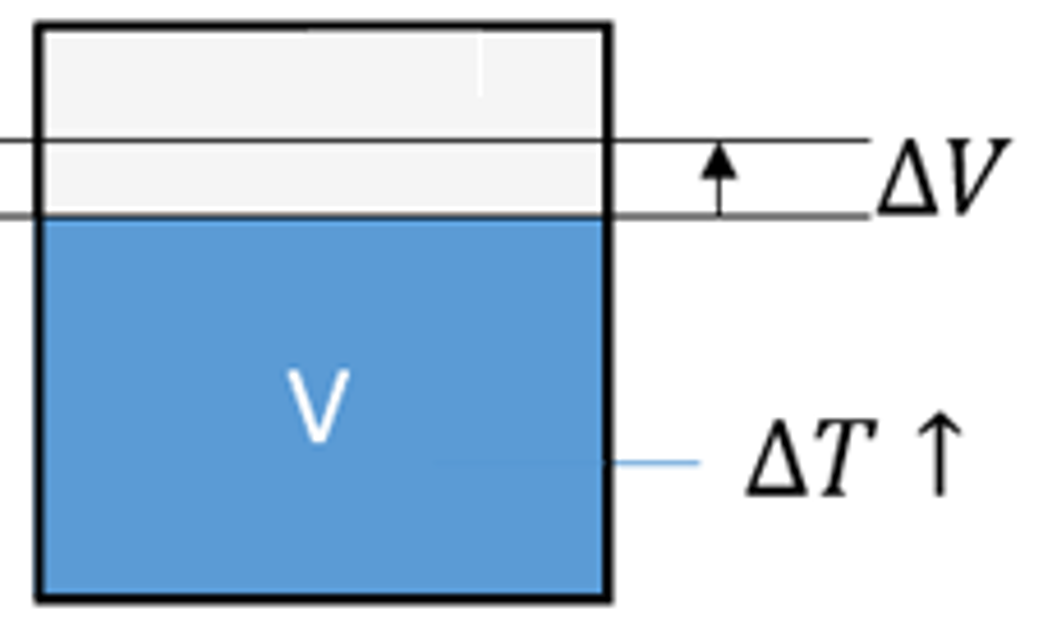
Oil Volume Variation
The variation in the oil volume based on the pressure to which it is subjected was already taken into consideration. With this new evolution, the influence of temperature on the oil volume will also be considered.
New Process Illustrated Component Library
A new library of illustrated components is available to extend the areas of application of didactic benches. Process components were added in order to be able to use volume control, temperature control and HVAC-type systems for training purposes.
New Language
The Python language has been added for creating scripts in Automation Studio™.
New Blocks
Additional blocks have been added to cover a wider range of modeling cases. Moreover, some of these blocks help streamline certain functions.
New Current Transformers
The new Current Transformers have two simulation models: the simplified model and the advanced model. The simplified model has a limited number of parameters such as frequency, transformation ratio and values not to be exceeded. It simulates, in addition to the transformation factor, the safety factor and the thermal overload current. If exceeded, an error message is generated. The advanced model, more realistic, uses construction parameters and simulates the remanence effect and the saturation effect.
New lights and lamps
The new lights and lamps have several simulation models that allow taking into account the parameters of voltage, power, luminous flux and luminous efficacy.
Export to XML IEC 61131-10 format
Ladder diagram documents are now exported in XML format as defined by IEC 61131-10.
Multiple Translations
BOMs and reports now provide the possibility to display data in multiple languages at the same time. A new BOM and report field called “User Translated Property” can be used to select a term to translate and the language into which it should be translated. The text is translated using the translation manager database.
The translation field can be added multiple times so that any number of terms can be translated into as many languages as required.
Custom Component
Access to documents that define the behaviour, logic or symbol of a custom component is possible even if the component is grouped or assembled with other components. This development allows, for example, the declaration of failures in the behaviour of any custom component from the illustrated (educational) libraries.
Component Appearance
As has already been done for hydraulic components, it is now possible to configure the appearance in simulation and edition mode of pneumatic, mechanical and control components. Different parts of components can easily be distinguished, such as mobile or fixed parts, the active or inactive elements, fillable volumes and pressurized areas. Standards have been predefined, but users can create their own.
These visual improvements make it possible to transform a design diagram into a document dedicated to training or technical publication, simply by changing the document standard.
Title Block Editor
This new feature allows any user to create their own title blocks. The title block is drawn directly on the diagram, making it possible to immediately see the result.
The title block structure is drawn using lines. The content can be simple text, user-editable text or text retrieved from configured application settings. All of these elements can be added very easily inside the title block frame.
A title block can consist of several frames. Each frame can be positioned anywhere on the page or automatically attached to a corner.
Modify the value of a dimension
It is possible to add linear and angular dimensions on technical drawings. These dimensions can be attached to predefined anchors or customized by the user.
Placing customized anchors precisely on a diagram using the mouse can be difficult. It is now possible to directly specify the value of a dimension or an angle.
Improved system for calculating the cost of a manifold block
An estimate of the cost of a manifold block can be obtained by adjusting parameters in the price database.
2 tables have been added to this database. They now allow the user to enter the machining time per drill bit and per cavity type. This brings precision to the overall calculation of the manifold block cost.
Polygon, arc and curve shapes available for technical diagrams
It is now possible to draw polygon, arc and curve shapes on technical drawings.
Updated Residential Electricity Component Library
A new section with blueprint elements has been added to the residential electricity illustrated component library. This section includes outlets, switches, walls, doors and more to draw a completed electric blueprint of a house or apartment for training purposes.
Updated PID Blocks
The prebuilt PID control blocks have been revised to include a filter coefficient on the derivative branch, command signal output limits, and a back calculation anti-windup on the integrator branch.
New Components
- Added (thyristor, transistor, DIAC, TRIAC and optocoupler) and updated components in the illustrated library "Electrical - motor control renewable energy".
- Updated the illustrated library "Electrical - DC electrical".
New Components
- Additions and updates of shaft-mounted speed and position sensors and encoders: Potentiometric Sensor, Resolver Sensor, Synchro Sensor, Inductosyn Sensor, RVDT Sensor, Incremental Encoder, Absolute encoder, 90° Hall Effect Sensor, 120° Hall Effect Sensor and Incremental encoder with direction of rotation port.
- We can plot A(θ), B(θ) and Z(θ) from the Incremental Encoder. By analyzing these plots, we can determine the motor's direction of rotation based on the phase relationship between A and B. Additionally, by examining Z(θ), we can calculate the RPM, as the Z pulse occurs once per revolution.
- We can plot and compare relative position calculated by the decoder to the angular position of the motor. We notice that both signals match meaning that the decoder is working correctly.
Ability to Define Custom Material Names
The Automation Studio™ Manifold Workshop contains generic material names that may not be suitable for the application user.
It is now possible to define custom material and material finish names.
Dynamic Tables for Technical Drawing Title Blocks
It is now possible to define tables, attached to the title blocks of technical drawings, that automatically fill with project data.
The data can come from the part list or revisions.
Further improvements have been made in the title block editor.
Export Technical Drawings to DXF
The technical drawing and the production drawing can be exported in PDF and DXF formats.
Additionally, the tables containing part lists, revisions, technical data or machining operations have been improved to allow modification of text fonts.
CETOP with Through Mounting Holes
The generic CETOPs available in the Generic Catalogue now contain the “Through Hole” option for mounting holes.
Dynamic Measurement System Improvement
Dynamic measurements make it easy to move elements in 3D.
The improvement concerns CETOP-type elements. It is now possible to take a measurement and move the CETOP from any of its sub-elements (Ports, mounting holes, locating pin).
Robotics Workshop
Collaborative robots (Cobots) can now be simulated in Automation Studio™. Users can easily put them in a simulation work cell, program them, visualize their actions in 3D, and analyze their performances.
Stability and performance improvements are included in this new version of the Robotics Workshop.
Improvements to the Cylinder Model
It is now possible to add cushioning to cylinders. Two methods of specifying the cushioning are available: simplified, or by curves. The simplified model uses a fixed diameter of orifice and a set length of application of cushioning on the first two ports of the cylinder. The curve model allows a variable cushioning curve to be added on each port of the cylinder.
The effects of cavitation on a cylinder that is included in a mechanism will now be calculated.
A new model for calculating the effects of resistive forces on a cylinder in a mechanism has been developed. This model allows the simulation to run significantly faster when there are friction forces on a cylinder.
Variable Displacement Pumps and Motors
The control piston model for pumps and motors has been reviewed making it more reliable and adding configurable internal restrictions at the control piston ports.
Setting the Communication Speed
It is now possible to select the CAN bus communication speed to suit the connected elements. The following speed options are available: 100 kbit/s, 125 kbit/s, 250 kbit/s (default value), 500 kbit/s and 1 Mbit/s.
New Distributor-control Solenoids
The distributor control solenoids have been revised to take into account the types of solenoids available on the market. The types of solenoids available are: DC ON/OFF, AC ON/OFF, DC/AC ON/OFF (with or without protection), AC/DC ON/OFF with rectifier, DC proportional and proportional with integrated analog control. We have also added the power reduction connector and the proportional solenoid controller.
Each solenoid has several simulation models: simplified circuit (simulation from power), equivalent circuit (simulation from resistance and inductance) and dynamic model (taking into account transients). The model takes into account the effect of temperature which has an effect on the current and the position.
New Symbols for Cable Representation
This version includes many new symbols to make it easier to represent cable geometry on the electrical diagram.
Power Balance and Temperature Calculation on DC Machines
The power balance is automatically calculated in simulation on DC machines (absorbed power, Joule losses in the armature, Joule losses in the field, constant losses, useful power and efficiency).
The machine temperature is calculated according to the cooling method (free convection, self-circulation, independent device mounted) and room temperature.
Siemens Ladder Diagram
The Siemens PLC Ladder Diagram has been improved and is now available from the main library under the title Ladder Diagram for Siemens 1200 Series PLC . The old version of the workbench has been retained and is still available under the Ladder Diagram for Siemens PLC-Basic.
New search in online catalogues
The new version of Automation Studio™ online catalogues now allows advanced searches based both on keywords and on technical properties present in the catalogues. The technical data to be searched can be quickly defined and filtered based on manufacturers and catalogues, thanks to a new user-friendly interface.
New and updated manufacturers’ catalogues
Many Manufacturers' Catalogues have been added and updated. The new technical data allows compatible manufacturer components to be used within the Hydraulic Manifold Block workshop, and enables direct integration of the pre-configured and documented manufacturer components into your Manifold Block in Automation Studio™. Manifold compatible components are identified in the Catalogue Manager.
- Argo-Hytos NEW
- AVENTICS UPDATED
- BUCHER Hydraulics SOON
- Cy.Pag UPDATED
- Dana Brevini Pumps & Motors UPDATED
- Danfoss MVB Valves NEW
- Danfoss Pumps and Motors UPDATED
- Hengli Cartridge Valves NEW
- Hengli Mobile Valve NEW
- HydraForce UPDATED
- Koganei UPDATED
- Parker Industrial Proportional Directional Control Valves UPDATED
- Parker Motors UPDATED
- Related Fluid Power SOON
- Sun Hydraulics UPDATED
- Weber-Hydraulik NEW
- Yuken Pumps UPDATED
- Yuken Valves UPDATED
Additional Manufacturers' Catalogue components are added and updated on a weekly basis.
New machining parameters list and export
The list of all machining operations can be generated once the 3D manifold design is completed. The types of machining operations are described according to industry standards. Each parameter can be directly modified from the list, with the values being automatically updated on the 3D layout and in the technical drawings.
Interface Automation Studio™ with Mastercam™
This list of machining operations is exported as an XML file. This allows direct transfer of machining information from Automation Studio™ to CAM software to help streamline production.
Generic orifice plug
An orifice plug component with various configurable sizes has been added to the generic manifold catalogue.
Cavity thread visualization
Cavity threads are now represented visually in the Cavity Manager and in the 3D Manifold Layout.
Spotface / counterbore merge
It is possible to remove a spotface from a cavity if the cavity already contains a counterbore.
Own hole closure catalogue
Default hole closure plugs are available in the application. It is now possible for a user to have their own hole closure catalogue.
Manifold auto-create feature
Sorting parameters for “Auto-Create” routing solutions can now be customized.
Technical documents
Improvements have been made to the technical and production drawings, including the ability to add arrows at the end of a line, add machining information and group callouts. The machining parameters can be displayed as tables on the production drawing document. The new version allows them to also be displayed as callouts around the views.
Block cost calculation system
A new cost calculation system was added. All the data relating to the manifold block are exported to an Excel file (part list, machining parameters, diagrams, etc.). The user can then create their own block cost calculation formulas based on the actual block data.
New manufacturer cavities
Additional manufacturer cavities have been made available for use in the manifold workshop.
- ARGO-HYTOS
- Bosch Rexroth
- Bucher Hydraulics
- Dana Brevini
- Danfoss
- Delta-Power
- Eaton
- FEMA
- HAWE Hydraulik
- Hengli Hydraulics
- HYDAC
- HydraForce
- Oilgear
- Parker
- Related Fluid Power
- Sun Hydraulics
- Wandfluh
- Weber-Hydraulik
- Yuken
New GRAFCET module
The new GRAFCET module fully complies with the IEC 60848 standard and allows programs to be edited and simulated. Our GRAFCET module allows the usage of different input event types, output modes (continuous and stored modes), structuring (partition, forcing, enclosing, macro-steps).
New SFC module
The new SFC module fully complies with the IEC 61131 standard and allows programs to be edited, simulated and, later on, exported. Conditions and actions can call the project's ladder diagram networks (LD). The module supports structured text language (ST). It also takes into account the different action qualifiers, as well as control actions with or without a final scan.
New connector builder
The new builder allows bills of materials and images for 2D and 3D diagrams to be configured for connectors. New pin, socket and connector symbols have been added.
Virtual Trainers
Automation Studio™ offers a series of ready-to-use training benches which demonstrate how to design technical functions by connecting components from different technologies, by programming automated machines to activate operative parts. The DIGITAL TWIN of your hardware trainer can be easily created. Flexible links have been implemented to complement the 2D CAD illustrated libraries in reflecting the visual aspects of hardware trainers for both fluid power and electrical technologies.
Multitechnology Diagrams
The addition of Multitechnology Diagrams makes it possible to group together, on the same page, hydraulic, pneumatic and electrical components as well as circuits made in a ladder diagram and human-machine interface elements, recreating a realistic digital twin.
Library of illustrated hydraulic components
This library allows users to create comprehensive illustrated hydraulic circuits to meet educational and training needs.
Library of cutaway pneumatic components
To meet the needs of training departments, this library has been added to create pneumatic circuits that display the internal workings of the most commonly used pneumatic components.
Zoom increase
The zoom can go up to 4000% so that objects can be drawn more precisely for animation purposes.
Visual usage indicator
Visual cues have been added on various components, which make it easier to identify, for example, which cylinders participate in a mechanism, what is the source of the electric charge and its operating quadrant and in which direction the mechanical power is transmitted.
2D animations
This enhanced visual interface improves the user experience when creating 2D animations, all visible in one place. A preview of the animations will help you validate the expected behaviour.
Quick line type selection
While drawing a conduit or a wire, or after selecting it, you can modify the type of link from a list which is displayed instantly.
Dynamic adjustment of actuator forces
To make initial testing easier and quicker, and to eliminate the need to define forces in advance, forces can be applied to the hydraulic and pneumatic actuators in simulation by clicking on them while the simulation is running.
Component categories
To define specific naming rules or particular appearances based on the type of component, the component categories have been developed. Each category can have a unique set of attributes that differentiates it from the other categories.
New options for colouring electrical wires in simulation
You can now choose the criterion for colouring electrical wires in simulation, based on thread type or globally. In addition to the type of current, one can choose colours according to the level of voltage or the level of current. You can also keep the appearance that the wires have in editing.
Orbitrol
The Orbitrol model has been redesigned with the aim of addressing all identified usage scenarios.
New catalogue of mathematical blocks
The catalogue of mathematical blocks will open the possibility to create custom and adjustable components, objects, functions and systems from mathematical models to drill down into the sub-component level.
You can now choose the behaviour you want for the components in your circuits during simulation: by performance curve, mathematical models of your own, or both. This catalogue gives an unmatched flexibility to Automation Studio™.
New block components
This library is enriched with mathematical blocks allowing matrix calculations as well as complex number operations.
DC machines
New DC machines (motors and generators) operate in all four quadrants and have mechanical connectors. This includes permanent magnet, separately excited, series wound and shunt wound.
Operational amplifiers
The new operational amplifiers make it possible to carry out the basic assemblies.
Three phase induction motor with neutral, squirrel cage
To complete our range of motors, we have added the asynchronous motor with neutral.
Improved synchronization in certain cases where internal and external cosimulation is used.
Component Hyperlink Zoom
The zoom level can be set independently for each document. This zoom level is used when clicking on a hyperlink (BOM, jump, etc) that points to a component on the document.
The zoom option can be accessed in the properties of the target document.
Line colour in simulation per line type
The simulation colour as a function of pressure/flow/speed/temperature for hydraulic and pneumatic conduits can be set independently for each line function.
For example, different pressure thresholds can be set for working lines vs pilot, return and drain lines.
Text list variable
It is possible to create variables that consist of lists of custom text. There are no restrictions on the type of text that can be used for elements in the list.
This type of variable allows discrete lists to be created.
Breather
It is possible to connect a breather to any of the top ports of a custom reservoir. This port must be declared as pneumatic.
It is thus possible to regulate the air pressure in this type of tank, either by directly connecting a breather or via a pneumatic circuit.
New illustrated electrical component library
A new illustrated component library has been created to extend the capacity to build digital twins. French residential electrical components have been added so that unambiguous residential electrical circuits can be drawn visually.
Step by Step Mode
The increment used by Step by Step mode can now be modified. The simulation will advance by a step which can be set by the user.
Dynamic Measurements
Dynamic Measurements are automatically displayed on the 3D Layout as soon as a component or a drilling is selected and/or moved. This makes it possible to quickly position and adjust any 3D objects on the block. The displayed measurements are the position relative to the 4 edges of the block, the depth of a counterbore and the datum for a buried component. For the drillings, the depth and the angles are also displayed.
The user can directly edit the displayed values by clicking on them and modifying them.
GD&T Font (Geometric Dimensioning and Tolerancing)
The GD&T (Geometric Dimensioning and Tolerancing) font is now available in technical drawings and can be used to draw special characters for the dimensioning information.
Representative Machining Callouts
This new feature is integrated in the automatic Production Drawing creation. Special configuration options have been added.
System Specifications
Using functional groups, you will be able to group components that are part of a specific function and sub-function of your machine (such as: primary system, secondary system, auxiliary system, cooling function, etc.).
For each of the functional groups identified, you will be able to define different operational modes with activation and termination conditions to measure performances.
You will be able to quickly obtain the current performances and validate that all design criteria of your system have been met through simulation.
Multiple Directional Valve Flow Curves
The flow through an internal channel can now be set as a function of the value of several differential pressures measured at its ends. This improvement of the model makes it possible to perfectly simulate the performance of manufacturers' distribution valves whose specifications cover a wide spectrum of working conditions.
Pressurized reservoir
In the hydraulic reservoir builder, it is possible to define ports on the upper surface of the reservoir as pneumatic ports. The simulation of enclosed air will cause a variation in pressure based on the volume of oil. A pneumatic system can also be connected to regulate this pressure.
Line jump with reservoir symbol
This component helps with representation and simulation of multiple returns to case drain within a pump or motor assembly, among other things.
True RMS
The measurement of true RMS values and frequencies of electrical signals have been improved and can handle all types of signals.
Pneumatic pilot
Directional valve pneumatic pilots take negative pressure (vacuum) into account in the calculation of the force applied to the spool.
Diagnostics
New diagnostics have been developed to help understand circuit design. The first diagnostic identifies any components that have been created using the custom components module. The second diagnostic identifies black box components or components that have a modified symbol.
Project Overview
In the project creation dialogue, a preview zone gives a quick look of the project content. The documents of the project can be scrolled through.
Hyperlinks
The hyperlink creation dialogue has been made more user friendly by providing a list of the available protocols, the required syntax and a brief explanation of the required fields.
Catalogues
When searching for a catalogue component equivalent to a component on the schematic, it is now possible to search either the online or local catalogues. This makes the online catalogues even more useful.
New Electrical Illustrated Component Library
A new illustrated component library has been created to extend the capabilities to build digital twins. One-Line electrical components have been added in order to be able to draw electrical transmission network circuits explicitly and visually.
Additionally, the following illustrated libraries are also available: pneumatic, PLC, DC electrical, renewable energy, residential electricity, hydraulic cross-section, and more.
New Electrical Symbols for Aeronautics
A new electrical symbol library has been added. It allows electrical circuits to be represented in compliance with the standards used in the aeronautical field. In the Automation StudioTM electrical schematic editor, these symbols are compatible with documents using the NEMA standard.
Component Frame
Each component or assembly of components can be framed without adding drawing elements.
The frame is manually adjustable and customizable; width, height, thickness, color and line type can all be modified.
Online Manufacturers’ Catalogues
Manufacturers' Catalogs are now available online. There is no longer a need to manage catalogue files or worry about updating them. The web Catalogue components are always up to date. Simply drag the desired components from your browser onto your Automation Studio™ schematic to use them.
User-friendliness
Shortcuts giving access to the layout of the current document as well as to its drawing scale have been added in the “Home” tab, “Documentation” group.
Optimization
Optimizations to generate more compact blocks.
User-friendliness
Addition of a dialogue box confirming the unit system selection when generating a new manifold block.
Custom Component Edition
To increase efficiency, the user can now edit the source circuits of a custom component without having to return to the original project. The user will be able to modify the symbol and its animation, its logic and behaviour circuits.
To meet the needs of training and technical publications departments, new line highlighting attributes have been added. The highlighted line endpoints can be flat or rounded, the corners can be square, rounded or chamfered, and the segments defining component connectors can be highlighted or not.
Appearance of Fluid Components
To meet the needs of training and technical publications departments, directional valve positions can be highlighted in edition and simulation according to their activation status. A library of additional objects can be provided on request in order to complete components that do not yet support these highlighting standards.
Appearance of Fluid Lines
To meet the needs of the training and technical publicatons departments, new appearance attributes for each line type have been added. Highlighting can now be activated in simulation, can support patterns, and can be full or sectional.
Naming Rules
The naming rules are enhanced with new attributes. The user can display the dimensions in fractional form in the names of the lines, select the unit system, the precision, etc. The available variables have been organized to more clearly indicate thier use.
Export in Simulation Mode
To meet the needs of training and technical publications departments, it is possible to export circuits in a graphic format while the simulation is running.
Manual Override With Detent
Directional valve command to represent a manual override with detent groove, according to ISO 1219.
Directional Valve Springs
An option has been added to adjust the spring compression screw during simulation.
Directional Valve Power Curves
An option has been added to define the power curves of a directional valve from the differential pressure or the inlet pressure.
Downstream priority pressure compensator
This component is designed to be used downstream of an orifice as a pressure compensator. When used to maintain a pressure differential on an upstream orifice, this valve can maintain a constant priority flow regardless of the downstream load.
Upstream priority pressure compensator, with static load sense
Upstream priority pressure compensator, with static load sense. This valve is intended to provide priority flow in the required amount while allowing excess flow to be used for auxiliary functions and maintaining a constant pressure drop across the control flow orifice, regardless of the load pressure.
Upstream priority pressure compensator, with dynamic load sense
Upstream priority pressure compensator, with dynamic load sense. This valve is intended to provide priority flow in the required amount while allowing excess flow to be used for auxiliary functions and maintaining a constant pressure drop across the control flow orifice, regardless of the load pressure. The dynamic load sense feature generally provides a better response time. Additionally, it increases the spring differential on the control flow orifice by a ratio that depends on the orifice sizing.
Viscometer and Density Meter
A measurement component has been added in order to access the measurement of the kinematic viscosity as well as the density of the oil in a node of the circuit.
Proportional Pressure Regulators
Models are made sensitive to back pressure.
Coolers
An option has been added to define the dissipated power according to the inlet temperature, the outlet temperature or the average of these 2 values.
Liquid Collector Exhaust Pressure Type
This component uses pneumatic pressure and flow to collect and reuse hydraulic fluid that has leaked into the system.
Lubricator
The addition of a lubricator, which will allow constant and automatic lubrication to the correct level, is a necessity for most pneumatic components to work correctly and have a satisfactory life span.
Curve Modelling Restrictors
Pressure drops modelled by performance curves as a function of flow rate and variable opening - for air with simplified pneumatic modelling.
Block Components
New block components have been added to handle matrix operations and complex numbers.
2-Quadrant Curves in the Electric Motor
Added a two-way model. A new simulation model that takes into account the Torque-Speed characteristic Curve in the forward and reverse rotation has been added. In addition, a motor with 2 mechanical shafts is now available in the library.
4-Quadrant Joystick
Joystick to generate 4 control variables.
Temperature Generator
A slider was added to make it possible to change the temperature during the simulation.
Environment Variable Generators
Components with temperature or light as a simulation variable now use the environment variables of the essential subdivision where the component is located.
Lack of current or inrush brake
Asynchronous motor 6 connectors
Transistor
Behavioural improvement. A capacitor has been added to stabilize the voltage between the collector and the emitter and between the drain and the source.
Ladder for Mitsubishi MELSEC iQ-R Series PLC
Hydraulic Manifold Block Workshop
Create and edit manifolds in Automation Studio™ with the new Hydraulic Manifold Block workshop.
An Auto-Create function can quickly propose up to 100 manifold solutions based on your Automation Studio™ schematic and set constraints. You are then able to tweak the proposed designs to your liking.
Take pressure and flow measurements at any point in time during simulation.
New & Updated Manufacturers' Catalogues
Many Manufacturers' Catalogues have been added and updated. The new technical data allows compatible manufacturer components to be used within the Hydraulic Manifold Block workshop, and enables direct integration of the pre-configured and documented manufacturer components into your Manifold Block in Automation Studio™. Manifold compatible components are identified in the Catalogue Manager.
- Automation Studio™ Electrical - Variable Frequency Drives NEW
- CKD Corporation SOON
- Continental Hydraulics Valves NEW
- Cy.Pag. NEW
- Danfoss Orbital Motors UPDATED
- Doosan Mottrol NEW
- Eaton Sectional CLS & CMA Mobile Valves UPDATED
- Humphrey Products NEW
- IMI Precision / Norgren SOON
- Koganei UPDATED
- Linde Hydraulics UPDATED
- Mitsubishi Electric SOON
- Shanghai Guorui Hydraulic Technology co (GRH) POWER Valves NEW
- SMC Pneumatics NEW
- Tecnord SOON
- Wandfluh NEW
- Zhejiang Gaoyu Hydraulic Machinery Co Ltd NEW
Additional Manufacturers' Catalogue components are added and updated on a weekly basis.
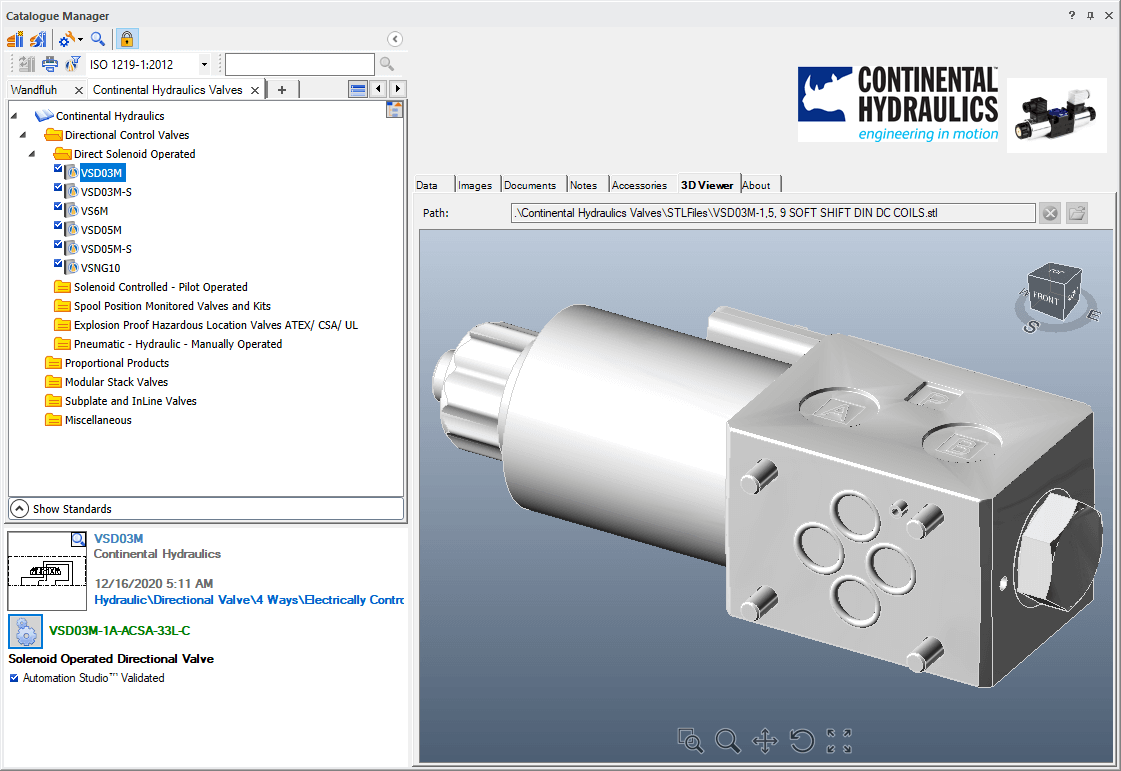
Online Manufacturers' Catalogues
The Automation Studio™ Web Catalogues lets you drag & drop components directly from the web browser interface to your Automation Studio™ schematic. These components are always the most up-to-date version. Therefore, there is no need to locally manage multiple manufacturers' catalogue files. The Web Catalogues for Automation Studio™ will be made available shortly after the release of Automation Studio™ P7.
New Hydraulic Components
- Planetary gearboxes
- Differentials and torque converters
- Separate control surface valves
- Pressure compensated flow dividers
- Jumps with label frame
Improved Hydraulic Components Simulation Models
- Hydraulic motor plates can now have a limited stroke
- Added an exchange surface area for the external dissipation of hydraulic heaters
- Improved curve tracking in pressure regulators
- Pressure compensated flow dividers
- Improved manual directional valve commands
Support of Transmission Shafts in the Mechanism Manager
The Mechanism Manager now accepts rotating drive shafts. This implies that all rotating elements, such as hydraulic, pneumatic, electric motors and gearboxes, etc., can now be simulated in the Mechanism Manager.
New Pneumatic Components
- Compressors
- Vacuum generators
- Vacuum cups
- Normally closed flow sensors
Failure Mode, Effects and Criticality Analysis (FMECA)
Quickly obtain and communicate system failure information, thanks to the new FMECA module of Automation Studio™. It is based on, but not limited to, [IEC 60812] Failure Modes & Effects Analysis. This can greatly reduce troubleshooting time and increase system reliability.
Renewable Energy Custom Library
The new Renewable Energy library is made with illustrated components. It enables to create and simulate circuits with look-alike components from real-world applications. Some components even animate during simulation, creating an optimal experience for training activities.
PLC Custom Library
This library was created to enable trainees to actually wire up the PLC (Allen Bradley, Eaton, Koyo, LS Electric, Mitsubishi, Omron, Siemens, etc.), write the Ladder Logic and run the simulation to see the inputs and outputs being triggered on the PLC according to their ladder diagram.
DC Electrical Custom Library
This illustrated library is intended for DC electrical circuits. Components can be connected directly or by using the breadboard to create and simulate your circuit.
Residential Electricity Custom Library
Trainees can now quickly build residential electrical circuits using common components which they are familiar with.
Hydraulic Cross-Section View Library
Create your circuit using hydraulic components with a cross-section view that is animated during simulation. Trainees can now quickly visualize the flow movement in the circuit.
Hydraulic Cylinders with Load Custom Library
This custom library allows to quickly vary the cylinders load during simulation and instantly see how it affects the system.
Terminal Strips Builder
New terminals with jumper channels management of different categories were added:
- Feed-Through
- Ground
- Feed-Through with Ground
- Knife Disconnect
- Disconnect
- Sensor / Actuator
- Fuse Holder
- Distribution Blocks
Simplified terminals are still available. The new builder allows complete management of the terminal strips, including the accessories management and the part numbers. Terminal strip export and import functions are also available.
New Semiconductor Devices
New semiconductor components have been added to the Electrotechnical library, such as:
- Bipolar Junction Transistor (BJT)
- Junction Field Effect Transistor (JFET)
- Metal-Oxyde-Semiconductor Field Effect Transistor (MOSFET)
- Thyristors
Thyristors, bipolar transistors and field effect transistors have been introduced. The thyristor can be controlled by a variable or by an external circuit and the transistors have been designed to operate in both switching and amplification mode.
Improvement of the Battery Component
- The ageing effect on the battery capacity is now taken into account
- OCV hysteresis effect is taken into account by differentiating OCV vs SOC curves during charge and discharge
- New advanced model taking into account the voltage transients' behaviour during charge and discharge
- Predefined battery parameters for the different available battery types
AB-500 and AB-5000 Compatible Functions and Addresses
These new libraries are an update from our original library that did not include all the major functions. These two new libraries enable you to create control circuits using addresses (AB-500) or tag names (AB-5000).
Additional Math Block Components
Adaptors in (math) blocks enable the creation of complex behaviours for fluid power and electrical components.
New Discussion Forum
Many customers want to share their schematics with other parties or simply share their experience. The new Forum allows access to demonstration files, custom libraries and other information that can be helpful to your applications. We hope that you will also share your experience with everyone. If you don’t have an account in the Forum, register here
Virtual Systems Using Unity 3D
Virtual systems created using Unity 3D allow for a training experience with a high level of realism. These systems can be controlled within Automation Studio™ using Electrical Controls, PLCs and/or Sequential Function Chart. Access the Forum to download the files and procedure to install the Unity 3D models. New virtual systems are frequently added.
Online Help
You can now access Automation Studio™ help documentation online. The online help documentation is constantly improved and updated based on users' support cases and feedback. Also, the software installation file size is reduced.
Mouse Options Configuration
The new mouse button configuration menu allows users to set their desired mouse buttons behaviour in Automation Studio™.
Smaller Simulation Pace
New simulation steps of up to 1 micro-second are available to allow finer simulations. This feature is particularly useful to simulate high frequencies phenomena (up to 100kHz), especially in the electrical workshop.
Conservation of the Internal Identifier of a Component When Replaced
Component internal identification can be maintained when replacing the component. This is useful for systems that have a unique identifier for each component.
Other Customer Requested Improvements & Bug Fixes
- Performance improvements
- Fixed the radial speed variable of the transmission power units
- Fixed discrepancies of the output pressure value of the "Pressure and Temperature Flow Control" component
- Fixed the flexible lines acting as a plug after a while in simulation
- Fixed the behaviour of unloading valve with check and drain
- Changed the image shown in the component properties of the "Bidirectional Motor with Shaft"
- Fixed the Curve Export API not exporting all curves
- Fixed an incorrect pressure at port 2 of the pneumatic "Remote Pressure Reducing Valve" component
- Fixed unhandled exception error in PLCs when the '&' character was inserted in the description
- Fixed BOM order changing when a model is saved
- Fixed an issue with the BOM and lines when exporting to PDF
Manifold Block Workshop
New features are available with SR1 improving your experience during the design, documentation and simulation of your manifold blocks:
- Improvement of routing algorithms and in particular those of oblique channels;
- Addition of CETOP-type components and interfaces in the generic library;
- Ability to create a custom title block;
- Revision table available in the technical drawings;
- Customization of the number of decimal places that can be displayed on technical drawings;
- Improvement concerning the dimensions on the technical drawings (offset, movement);
- Ability to adjust the position of the shapes on the cavities of the generic components.
Installation and Circuits
The limit of 30 types of lines in installation circuits has been raised to better meet user needs.
New Hydraulic Components
- Instant temperature regulator;
- Mechanically activated check valves;
- Sequence valves normally open, with internal drain and external drain;
- Cartridge valves normally open;
- 3-way sequence valve normally closed;
- Restrictive pressure compensator positioned downstream.
Improved Hydraulic Component Simulation Models
- Addition of a pressure drop curve in the flow transducer;
- Improvement of the proportional flow regulator.
Mechanism Manager
Support for mechanically linked jacks in the mechanism manager.
Troubleshooting Module
- You can now declare several parameters for the same failure, thus being able to model a minor, moderate or major failure.
- You can now report unidirectional internal leaks.
Wire Management
Wires can now be individually set as perfect without changing the global setting.
Ease of use
- A dialogue box prompts for the choice of unit during the assignment operation to facilitate the interpretation of the value of one variable assigned to another;
- It is possible to hide the identifier of dynamic measuring instruments.
Fluid and Line Manager
Pipes and wires whose properties are used by the simulator are displayed in blue.
Managing properties’ preferences is also possible.
Configuration Export
Software settings can now be imported and exported for uniform computer configuration.
Illustrated Libraries
A new command opens illustrated libraries directly from the application.
Project Manager
The page numbers of documents can be displayed in square brackets in all dialogue boxes that show the list of documents, such as the Project Explorer.
Video Recording
The video recording tool offers the possibility to replay its video to validate the content, to save it or send it immediately after creating it.
Hyperlink
When a hyperlink type custom property is displayed on the diagram, it becomes clickable.
Service Release Number
The service release number for your version has been added in the dialogue box opened by the "About" command.
Ticket Request
A command has been added in order to be able to request assistance from Automation Studio™ in the Support tab. It will then be sent automatically to a support agent.
Viewer
Export your Automation Studio™ projects in a brand new format suitable for the free Automation Studio™ Viewer. This file format removes properties from documents and components that the designer does not want to share. This file format can only be opened with Automation Studio™ Viewer, making it easy to share while maintaining a high level of confidentiality.
Electrotechnical inputs / outputs
These new black box components (Universal input, Universal output, Input converter and Output converter) make it possible to efficiently model and simulate Electrotechnical components that have versatile inputs and outputs such as controllers, sensors, etc.
Library of preconfigured PLC Cards
A new specialized library of PLC input and output cards offers you the possibility to quickly expand your range of teaching materials for educational activities in automation
Additions in the Hydraulic Block Manifold module
Improvements have been made to automatic routing, options for displaying dimensions on technical drawings and automatic management of stackable CETOP valves. It is also possible to decide whether the routing algorithm can use oblique channels or not in the case of a "Counterbalance valve" type assembly.